Microsoft Fabric's AI Skills No One’s Talking About
1 Stunde 24 Minuten
Podcast
Podcaster

M365 Show brings you expert insights, news, and strategies across Power Platform, Azure, Security, Data, and Collaboration in the Microsoft ecosystem.

Beschreibung
vor 9 Monaten
Many of us remember the days of drowning in spreadsheets and
overwhelming data requests. I still vividly recall my early
career, grappling with scattered information across multiple
systems, wasting valuable hours trying to compile insights. It
wasn’t until I discovered Microsoft Fabric’s AI Skills that
everything changed. In a world where data can drown your
decision-making efforts, this tool offers a lifeline. This post
will delve into the transformative capabilities of Microsoft
Fabric, illustrating both its potential and user-friendly
approach.
M365 Show is a reader-supported publication. To receive new posts
and support my work, consider becoming a free or paid subscriber.
The Data Overload Dilemma: A Common Challenge
As I look around, it’s clear that we’re drowning in data.
Organizations across various industries are grappling with data
overload. Everyone seems to be collecting data, but how many
truly know what to do with it? This isn't just a tech issue; it’s
a challenge that impacts business efficiency, strategy, and even
innovation.
Understanding Data Overwhelm Across Industries
Data overwhelm is a universal challenge. Whether you’re in
healthcare, retail, or finance, the struggle is the same. Each
day, more data is generated than the last. Have you ever stopped
to think about how this affects your organization? The truth is,
many businesses collect data from over 400 different sources.
Yet, astonishingly, over 90% of the data generated today
remains unused.
Statistics on Data Generation and Usage
Consider this: every minute, we create a staggering amount of
data. From social media posts to transaction records, the flow of
information is relentless. This constant influx leads to a
paradox; while we have access to vast amounts of information,
sorting through it can feel like searching for a needle in a
haystack. Organizations are left feeling overwhelmed, unsure of
how to extract valuable insights from the chaos.
Personal Experiences with Data Management Issues
I’ve witnessed the frustration firsthand. In my experience, I’ve
seen teams struggle to manage the data they have. Reports take
longer to generate, and crucial insights often slip through the
cracks. This can lead to missed opportunities and a lack of
competitive edge. For instance, I worked with a retail company
that took three days to generate data reports. That’s three days
of potential decisions lost!
Impact on Decision-Making Efficiency
When data is scattered and hard to access, decision-making slows
down. When we lack timely access to information, we risk making
uninformed choices. I often hear,
“In today's fast-paced business environment, timely
access to data can be the difference between thriving and merely
surviving.”
This statement rings true. Organizations need to be able to act
swiftly and effectively. Without streamlined access to data, we
end up with bottlenecks that hinder our ability to respond to
market changes.
The Necessity for Streamlined Data Access
So, what can be done? Streamlined data access is crucial. By
implementing tools that simplify data retrieval, organizations
can empower their teams. Imagine if your marketing team could
access real-time data without waiting for IT approval. Wouldn’t
that make a difference? It’s all about democratizing information.
The easier it is for everyone to access data, the more insights
can be generated.
Balancing Technical and Non-Technical User Needs
One of the biggest hurdles is balancing the needs of technical
and non-technical users. Not everyone is a data analyst, and
that’s okay! The challenge lies in finding tools that cater to
both. For instance, AI-driven solutions can bridge this gap. They
allow non-technical users to ask questions in simple language and
receive immediate, actionable insights. This capability is what
keeps organizations competitive and agile. As I like to say,
“The ability to seamlessly navigate through abundant data
allows organizations to stay competitive and agile.”
To sum it up, the data overload dilemma is real. Organizations
need to recognize that it's not just about collecting data; it's
about managing it effectively. In a world where every second
counts, having streamlined access to insights can make all the
difference. The more we can do to address the data overload
challenge, the better equipped we will be to make informed
decisions that drive success.
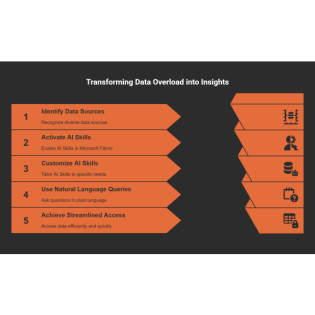
Unlocking AI Skills in Microsoft Fabric: A Step-by-Step
Guide
In today’s fast-paced digital world, data is everything. However,
many organizations often find themselves overwhelmed by the sheer
volume of data they handle. This can lead to delays in generating
reports and missed insights. Enter Microsoft Fabric’s AI Skills
feature—an innovative solution that aims to democratize data
access. I’ve seen firsthand how this feature can turn
non-technical users into effective data analysts, all through the
power of plain language queries.
Overview of AI Skills Capabilities
So, what exactly are AI Skills? Simply put, they allow users to
interact with data in a way that’s intuitive and straightforward.
Imagine asking a question about your sales data as if you were
talking to a colleague. For instance, you might say, “Show me the
top 10 customers by revenue in Q2.” The AI translates that into a
data query, providing immediate answers. This eliminates the need
for technical expertise in languages like SQL or DAX.
The fundamental advantage here is accessibility. AI Skills
empower everyone—from marketing teams to finance departments—to
engage with data effectively. It breaks down barriers that often
make data analysis feel intimidating.
Walkthrough of the Activation Process
Activating AI Skills is designed to be straightforward and
user-centric. You can complete the activation in under an hour!
Here’s a simple walkthrough:
* Log into your Microsoft Fabric account.
* Navigate to the AI Skills section in the dashboard.
* Follow the guided prompts to enable AI Skills for your
organization.
Once activated, you’re ready to start utilizing the AI
capabilities. The entire process encourages user engagement by
being simple and efficient, ensuring that anyone can take
advantage of these powerful tools.
Tips for Customizing AI Skills for Specific
Needs
Each organization has unique data needs. Here are some tips for
customizing AI Skills:
* Understand Your Data: Review the types of data
your organization uses most frequently.
* Train Your Users: Offer training sessions on
how to ask effective queries.
* Monitor Usage: Regularly check how users
interact with AI Skills and adjust settings accordingly.
Customization is key. Tailoring the AI Skills to fit your
organization’s environment can lead to more relevant insights and
data-driven decisions.
Illustration of Natural Language Queries
Using natural language queries might be one of the most exciting
features of AI Skills. Instead of needing to write complex codes,
users can simply ask questions. For instance:
* “What are our sales trends over the past six months?”
* “How many new customers did we acquire in the last quarter?”
The AI captures the user’s intent, converting these verbal cues
into actionable data queries. Imagine the time saved when a
three-day wait for data can be reduced to seconds!
Exploring User-Friendly Interfaces
Microsoft Fabric’s user interface is designed with the user in
mind. It’s intuitive and easy to navigate. You won't need a
technical background to find your way around. The dashboards are
visually appealing and provide a clear view of your data.
Moreover, features like tooltips and guided tours make it easier
for new users to familiarize themselves with the system. We all
remember the frustration of learning new software. But with
Microsoft Fabric, it is a breeze!
Utilizing Comprehensive Onboarding Tools
To make the most out of AI Skills, I suggest leveraging
comprehensive onboarding tools. These tools can help users:
* Access Tutorials: Step-by-step guides help
users understand how to use AI Skills effectively.
* Connect with Support: Access to customer
service or community forums can resolve issues quickly.
* Explore Case Studies: Learn from others who
have successfully implemented AI Skills.
Remember, the goal is to ensure everyone in your organization can
leverage these data capabilities easily. As I often say,
“Every organization deserves access to insights without
the need for technical expertise.”
In summary, Microsoft Fabric’s AI Skills feature presents a
remarkable opportunity for organizations to enhance their data
analysis capabilities. By understanding its capabilities,
navigating the activation process, and customizing the skills to
suit unique needs, businesses can reap substantial benefits. This
is an exciting time to embrace data-driven decision-making!
Case Studies in Action: Success Stories of AI Skills
Implementation
As we dive into the world of AI Skills, it's fascinating to see
how organizations from various industries have harnessed its
power. From retail to healthcare and financial services, the
results are nothing short of remarkable. Let's explore some
real-world case studies that illustrate the effectiveness of AI
Skills in transforming operations and generating value.
1. Retail Example: Faster Data Access
Imagine a bustling retail chain that struggles with responding to
market changes due to delayed data access. Before adopting AI
Skills, their merchandise planning team often waited up to three
days for data requests. This delay stifled their ability to make
quick decisions. But after implementing AI Skills, everything
changed.
With instant access to data, the team was empowered to react
swiftly to market demands. They replaced a three-day wait with
immediate answers. This speed not only boosted operational
efficiency but also enhanced customer satisfaction. What a game
changer!
2. Healthcare Improvements in Data Usage
In the healthcare sector, the impact was even more pronounced.
Organizations reported a staggering 340% increase in
active data users within just three months of
implementing AI Skills. This transformation significantly
improved decision-making across various operational aspects.
By democratizing data access, healthcare professionals could
engage with data easily. They no longer needed deep technical
knowledge to analyze information. Can you imagine the difference
this makes in patient care?
3. Financial Services: Speeding Up Client
Research
Now, let’s take a look at the financial services industry. A
major financial services company faced a challenge: client
research took an average of 30 minutes per call.
This was inefficient and not sustainable in a fast-paced
environment.
After adopting AI Skills, they managed to reduce this time to
under 3 minutes. This remarkable improvement
allowed client-facing teams to focus more on building
relationships rather than getting bogged down in research. The
shift highlighted the potential of AI Skills to enhance
productivity and client satisfaction.
4. Real-life Challenges Before AI Skills
Adoption
Before diving into these success stories, it’s important to
acknowledge the challenges organizations faced. Many struggled
with data overwhelm, which led to delays and missed insights.
Often, data was scattered across various systems—some
on-premises, others in the cloud or in legacy formats.
This fragmentation complicated the process of obtaining a
complete business picture. With AI Skills, these barriers began
to dissolve. The tools translated natural language into
executable queries, bridging the gap between technical and
non-technical users.
5. Quantifiable Benefits from Streamlined
Processes
The quantifiable benefits of adopting AI Skills are striking.
Companies have reported streamlined processes that not only save
time but also contribute to better decision-making. For instance:
* Healthcare: 340% increase in active data
users.
* Financial Services: Client research time cut
down drastically.
These numbers speak volumes. The efficiency gained through AI
Skills directly translates into improved operational workflows
and enhanced outcomes for businesses.
6. Broader Implications for Operational
Efficiency
What do these case studies mean for the future? The implications
are broad and significant. As more organizations adopt AI Skills,
we can expect a shift toward cross-functional analytics
departments. This means traditional silos will blur, leading to
faster and better-informed decisions.
"The real magic of AI Skills lies in its ability to
empower every team member, regardless of their technical
background."
That’s the essence of what we are witnessing. AI Skills
democratizes data access, allowing everyone to engage in
data-driven decision-making.
As we look ahead, it’s clear that the journey of AI Skills
implementation is just beginning. The insights gained from these
case studies can lead to industry-wide advancements.
Organizations that embrace these tools will not only enhance
their own operations but also contribute to the evolution of
their respective fields.
The Role of OneLake: A Unified Data Repository
As organizations grapple with the complexities of data
management, the introduction of OneLake marks a
significant shift. This innovative architecture is designed to
serve as a unified data repository, tackling the issues caused by
fragmented data environments. In this section, I will delve into
the benefits of OneLake, its essential architecture, and how it
simplifies data analytics for businesses of all sizes.
Introduction to OneLake Architecture
OneLake functions as a central hub where various data formats
converge. It supports over 15 different data
formats, making it incredibly versatile. Imagine a
library where every book is categorized, making it easy to find
what you need. Similarly, OneLake organizes data, ensuring users
can access it efficiently. Utilizing open standards such as Delta
Parquet and Apache Iceberg, it provides a seamless experience for
data users.
Benefits for Organizations Using Multiple Data
Types
In today’s data-driven world, organizations often deal with a mix
of structured and unstructured data. This poses a challenge for
analytics. OneLake addresses this by:
* Enhancing accessibility: It allows users to
retrieve needed data quickly.
* Facilitating better insights: By breaking down
silos, users can view data in context, improving decision-making.
* Empowering non-technical users: With its
user-friendly interface, even those without a technical
background can derive insights.
Isn’t it frustrating when you can’t find the information you
need? OneLake alleviates this frustration, helping teams focus on
deriving insights rather than struggling with data retrieval.
Mitigation of Fragmented Data Issues
Fragmentation is a common issue in data management. Organizations
often have data scattered across various platforms, making it
difficult to get a complete picture. OneLake acts as a
beacon of unification, guiding the way toward integrated
insights. By consolidating data, it reduces the time and
effort spent on data integration tasks.
Furthermore, this unification leads to:
* Streamlined workflows: Data is readily
available, allowing teams to focus on analysis rather than data
wrangling.
* Improved collaboration: Teams can work with
the same data, fostering better communication and outcomes.
Compliance and Governance Considerations
In an era where data privacy is paramount, OneLake's architecture
promotes compliance and governance. Its built-in features ensure
that organizations adhere to regulations while accessing and
utilizing data. By maintaining strict governance protocols,
OneLake helps organizations:
* Mitigate risks: Organizations can confidently
manage their data without compromising privacy.
* Ensure data integrity: Compliance checks are
integrated into the data structure, reducing the likelihood of
errors.
With OneLake, we can rest assured that our data governance
practices are robust and reliable.
Contextual Data Usage with Open Standards
The beauty of OneLake lies in its ability to maintain context
through open standards. This means data doesn’t just exist in
isolation; it can be contextualized for various analytical
processes. By leveraging open standards, organizations can:
* Enhance interoperability: Data from different
sources can be integrated smoothly.
* Facilitate rich analytics: Data is not just
stored; it’s made actionable.
Imagine being able to pull relevant data from multiple sources
seamlessly. That’s what OneLake offers—contextual data usage that
empowers analytics.
Simplifying AI Implementation Processes
Finally, let’s talk about AI. OneLake simplifies the
implementation of AI algorithms, allowing organizations to deploy
AI solutions without the usual headaches. With its structured
approach, teams can focus on building models and deriving
insights rather than worrying about data structure. This is vital
in a world where speed and accuracy are crucial.
In summary, OneLake represents a transformative solution in the
landscape of data management. It not only addresses the common
challenges faced by organizations but also paves the way for more
sophisticated analytics and AI applications. By consolidating
data and enhancing governance, organizations can unlock the true
potential of their data resources. I can't help but feel excited
about the future of analytics with OneLake leading the charge.
Harnessing the Power of Copilot: Your AI
Assistant
In today’s fast-paced world, data can feel overwhelming. We often
find ourselves buried under reports, struggling to extract
valuable insights. This is where Microsoft’s Copilot comes in.
It’s not just another tool; it’s your trusted AI assistant that
revolutionizes how we handle data.
Exploration of Copilot Functionality
So, what exactly is Copilot? Think of it as a virtual guide,
designed to simplify complex data tasks. With Copilot, users can
ask questions in plain language and receive instant responses.
It’s like having a personal assistant who understands your needs
and helps you navigate through the intricacies of data analysis.
* Natural Language Processing: Instead of
needing to master SQL or DAX, you can simply type, “Show me the
top 10 customers by revenue in Q2,” and get the answer right
away.
* Seamless Integration: Copilot works within
Microsoft Fabric, making it easy to access and analyze your data
without any technical barriers.
How Copilot Facilitates Report Creation
Creating reports can often be labor-intensive and time-consuming.
But with Copilot, the entire process is streamlined. By guiding
users through the report creation process, it ensures that even
non-technical employees can produce comprehensive reports
quickly.
Imagine you’re a marketing manager. You need a report on the
latest campaign's performance. Instead of waiting days for the IT
team, you can use Copilot to generate insights in minutes. This
boosts productivity and empowers teams to make informed decisions
faster.
Examples of User Interaction
Let’s look at some real-life scenarios. A retail manager might
ask Copilot, “What were my highest sales days last month?”
Copilot not only provides the answer but can also suggest
visualizations like charts or graphs to represent that data
effectively.
In another case, a healthcare administrator might inquire about
patient appointment trends. Copilot responds with a detailed
report and offers recommendations on how to optimize scheduling
based on the data.
Guided Analysis for Optimized Outputs
Guided analysis is another standout feature of Copilot. It’s like
having a mentor by your side, providing insights and
recommendations tailored to your needs. When you input a query,
Copilot analyzes the context and presents the most relevant
information.
This capability not only saves time but also enhances the quality
of the outputs. You get to focus on deriving insights rather than
getting lost in data. As I often say,
“With Copilot, users gain a trusted companion that
transforms how they interact with data and create
insights.”
Real-Time Recommendations and Visualizations
One of the most exciting aspects of Copilot is its ability to
provide real-time recommendations. For instance, if you’re
analyzing sales data, Copilot might highlight trends or anomalies
you hadn’t noticed. This proactive approach allows for quicker
decision-making and a more agile response to changes in the
market.
Moreover, Copilot can suggest appropriate visualizations based on
the data you're analyzing. Whether it’s a bar chart or a line
graph, it ensures that the information is presented clearly and
effectively.
Significance for Non-Technical Employees
Perhaps the most significant advantage of Copilot is its
accessibility for non-technical employees. Many workers feel
intimidated by data analysis, fearing they lack the necessary
skills. Copilot breaks down those barriers.
By empowering everyone in the organization, Copilot democratizes
data access. Employees across departments can harness the power
of data without feeling overwhelmed. This not only boosts morale
but also fosters a culture of data-driven decision-making.
In fact, organizations using Copilot have reported a 50%
decrease in the time spent preparing reports. This is a
game-changer in any business landscape.
As we move forward in this data-centric world, tools like Copilot
will become essential. They offer a way to harness the full
potential of our data resources, making analysis not just a task
but an engaging experience. With AI at our fingertips, the future
of data analysis looks bright.
Forecasting the Future of Microsoft Fabric AI: What's
Next?
As we look ahead to the future of Microsoft Fabric AI, there’s a
palpable excitement in the air. What’s coming next? What can we
expect? Allow me to share some insights into the developments on
the horizon. By anticipating these changes, organizations can
plan effectively and stay ahead of the curve.
Upcoming Features and Enhancements
First, let’s discuss the preview of upcoming features and
enhancements. We’re on the brink of a wave of updates that
promise to transform how we interact with data. In the next six
months, Microsoft plans to roll out significant updates, which
aim to enhance user experience dramatically.
* Conversational Memory: One of the most
exciting advancements is the exploration of conversational
memory. This feature will enable the AI to maintain context
during interactions, making conversations with your data smoother
and more intuitive.
* Industry-Specific Functionalities: Microsoft
is also working on tailored functionalities for specific
industries. This means the AI will be better equipped to handle
unique challenges and provide relevant insights.
* Evolving Governance Models: With the rapid
evolution of AI, there are ongoing considerations for governance
models. Ensuring compliance while embracing innovation is
crucial.
Implications for Long-Term Data Usability
These updates will have significant implications for long-term
data usability. As organizations adopt these features, we can
expect a shift in how data is accessed and utilized. It’s not
just about making data available; it’s about making it
actionable. The goal is to enable users at all levels to derive
insights without needing extensive technical know-how.
Moreover, the role of user feedback is paramount in shaping these
future developments. Microsoft is actively incorporating feedback
from its user base, allowing organizations to influence
enhancements based on their experiences and needs. This
partnership between users and developers fosters an environment
where tools evolve in a way that truly serves the community.
Data Insights and Growth Projections
Looking at the data, we can see a projected growth in AI
functionalities and user customization. As users become more
aware of AI Skills and its potential, we anticipate a surge in
adoption. This trend reinforces the importance of educating users
about these tools. Organizations that embrace this change will
likely find themselves at a competitive advantage.
"The future of AI Skills holds tremendous promise, paving
the way for an even more intuitive user experience with
data."
Thanks for reading M365 Show! This post is public so feel free to
share it.
Conclusion
In conclusion, the future of Microsoft Fabric AI is bright and
filled with potential. As we anticipate the wave of updates, it’s
clear that these advancements are not merely enhancements; they
are fundamental shifts in how organizations will engage with
their data. By integrating features like conversational memory
and industry-specific functionalities, Microsoft aims to
democratize data access even further.
I strongly encourage organizations to keep an eye on these
developments. By understanding the roadmap and integrating user
feedback, they can ensure they remain compliant and effective in
their data-driven endeavors. The evolution of governance models
will be crucial as we navigate this landscape, ensuring that
innovations align with regulatory needs.
As we move forward, I believe that companies that proactively
engage with these emerging features will not only improve their
operational efficiency but also enhance their decision-making
processes. The landscape of data utilization is changing, and we
must be ready to adapt. Let’s embrace the future of Microsoft
Fabric AI together, making the most of the incredible
opportunities it provides.
Get full access to M365 Show - Microsoft 365 Digital Workplace
Daily at m365.show/subscribe
Weitere Episoden

22 Minuten
vor 6 Monaten

22 Minuten
vor 6 Monaten

21 Minuten
vor 6 Monaten

22 Minuten
vor 6 Monaten

22 Minuten
vor 6 Monaten
In Podcasts werben


Kommentare (0)